Dashboard Redesign
MassMutual
TL;DR:
In 6 months, we redesigned MassMutual's homepage from a navigational pass-through into a primary control surface, surfacing policy data, payments, and key actions upfront so customers could resolve more without leaving the page. By restructuring information hierarchy and translating insurance complexity into clear, contextual summaries, customers shifted from skimming and navigating away (15.02s) to engaging and resolving in place (34.66s).
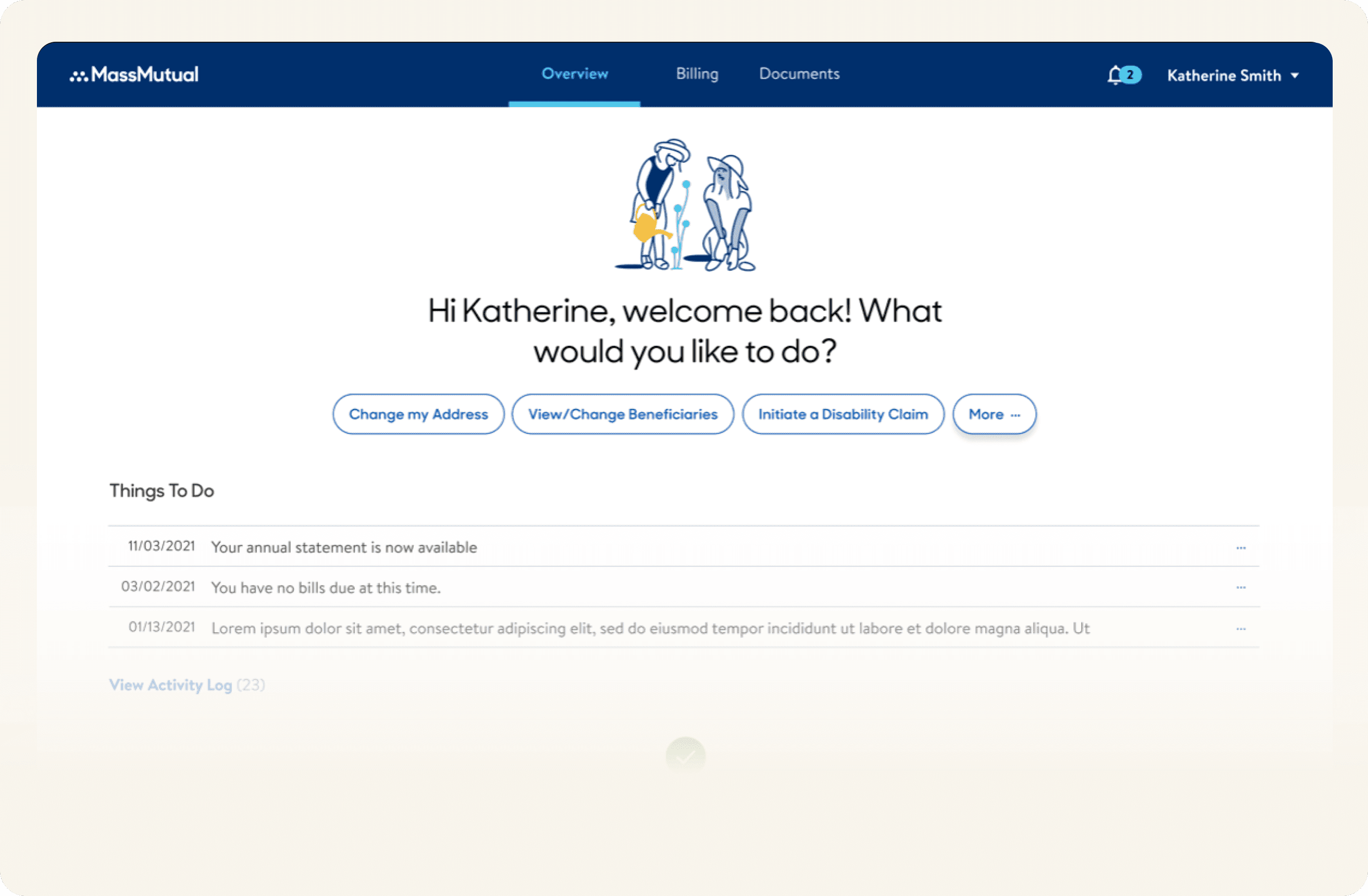
- 1 Product Designer
- 7 Developers
- 1 Product Owner
- 1 Business Analyst
- 1 Data Analyst
- UXR, Design Strategy
- Data Analysis, UX, UI
- 6 months
Project Overview
The insurance homepage served as the primary entry point for customers, yet it lacked clarity and prioritization, making it difficult for users to quickly understand their policies, see what mattered most, or take action with confidence. As insurance products and customer portfolios grew in complexity, the existing experience no longer supported fast, informed decision-making.
This project focused on redesigning the homepage to surface the most important policy details upfront while enabling users to complete key actions efficiently. By restructuring information hierarchy, simplifying complex insurance data, and tailoring the experience to each customer’s portfolio, the new homepage aimed to balance speed, clarity, and meaningful engagement, transforming the homepage from a passive landing page into an active control centre for policy management.
Impact
By pulling policy data, payment details, and key actions/information onto the homepage itself, we shifted customer behaviour from skim-and-navigate to engage-and-resolve. Median engagement time rose from 15.02s to 34.66s, not because tasks took longer, but because customers were now completing them on the homepage instead of navigating to find them. The homepage stopped being a pass-through and became the primary surface for managing their policies.
The Problem
How might we create an experience where users can perform actions quickly and see the most important details about their policy and products upfront?
Goals
- Enable fast, confident action:
- Design the homepage so customers can quickly understand their policy status and perform key actions without navigating deeper into the product.
- Surface what matters most:
- Prioritize critical policy information—coverage, status, payments, and next actions—so users can immediately assess their portfolio at a glance.
- Reduce cognitive load through clarity:
- Translate complex insurance data into clear, understandable summaries that support decision-making for both novice and experienced customers.
- Personalize the experience around the customer’s portfolio:
- Tailor content and hierarchy based on the user’s active products and policies, ensuring relevance rather than a one-size-fits-all dashboard.
- Increase meaningful engagement, not just visibility:
- Encourage deeper interaction with policy details by making the homepage a reliable starting point for understanding and managing insurance products.
Why was this needed?
The homepage had become misaligned with both customer needs and the product’s growing complexity. An outdated design system limited scannability and slowed decision-making, while the content model failed to surface information that supported real customer tasks or intent. As a result, the homepage no longer functioned as an effective control point for policy management, increasing friction and reducing user confidence.
Addressing this was necessary to re-establish the homepage as a high-trust, high-utility surface—capable of supporting fast action, clarity at scale, and meaningful engagement as customer portfolios evolved.
Decision: Treat the homepage as a decision-making control surface, not a navigational dashboard.
Why: Research showed users logged in to complete financial and policy-critical tasks, not to browse or explore.
Tradeoff: Reduced emphasis on secondary features and quick links.
Mitigation: Support deeper exploration contextually, without pulling users away from core tasks.
Challenges I encountered
- Redesign vs incremental fixes:
- Aligning stakeholders on whether to invest in a full homepage redesign versus applying short-term design fixes to the existing dashboard required clear articulation of long-term value and risk trade-offs.
- Building and scaling new design assets:
- The redesign required creating new UI components and content patterns that could scale across different policy types and customer portfolios.
- Research recruitment constraints:
- Identifying participants who matched specific policy and product criteria proved challenging, slowing qualitative validation at critical points.
- Legacy data migration dependencies:
- Migrating legacy policy and product data introduced technical complexity for engineering and extended the delivery timeline, requiring re-planning and expectation management.
Decision: Invest in a full homepage redesign rather than incremental visual fixes.
Why: The existing information model and hierarchy could not support growing policy complexity or fast decision-making.
Tradeoff: Higher upfront cost and longer delivery timeline.
Mitigation: Anchor the redesign in reusable patterns and scalable components to reduce long-term maintenance and rework.
Voice of Customers
To ground the redesign in real customer intent, we conducted a quantitative survey to understand the primary reasons users log in to the homepage. 4.7k customers responded, giving us high confidence in the signal.
The results clearly indicated that users primarily visit the homepage to manage financial and policy-critical tasks, not to browse or explore. This reinforced the need to prioritize billing, policy status, and dividend visibility upfront, while treating lower-frequency actions as secondary or contextual.
These insights directly informed the information hierarchy and interaction model, ensuring the homepage optimized for speed to action and clarity, while still supporting deeper portfolio exploration when needed.
Design Strategy
Insight: Insurance customers don’t need more options—they need help understanding what matters right now. When complexity is translated into clear, contextual information, confidence and action follow.
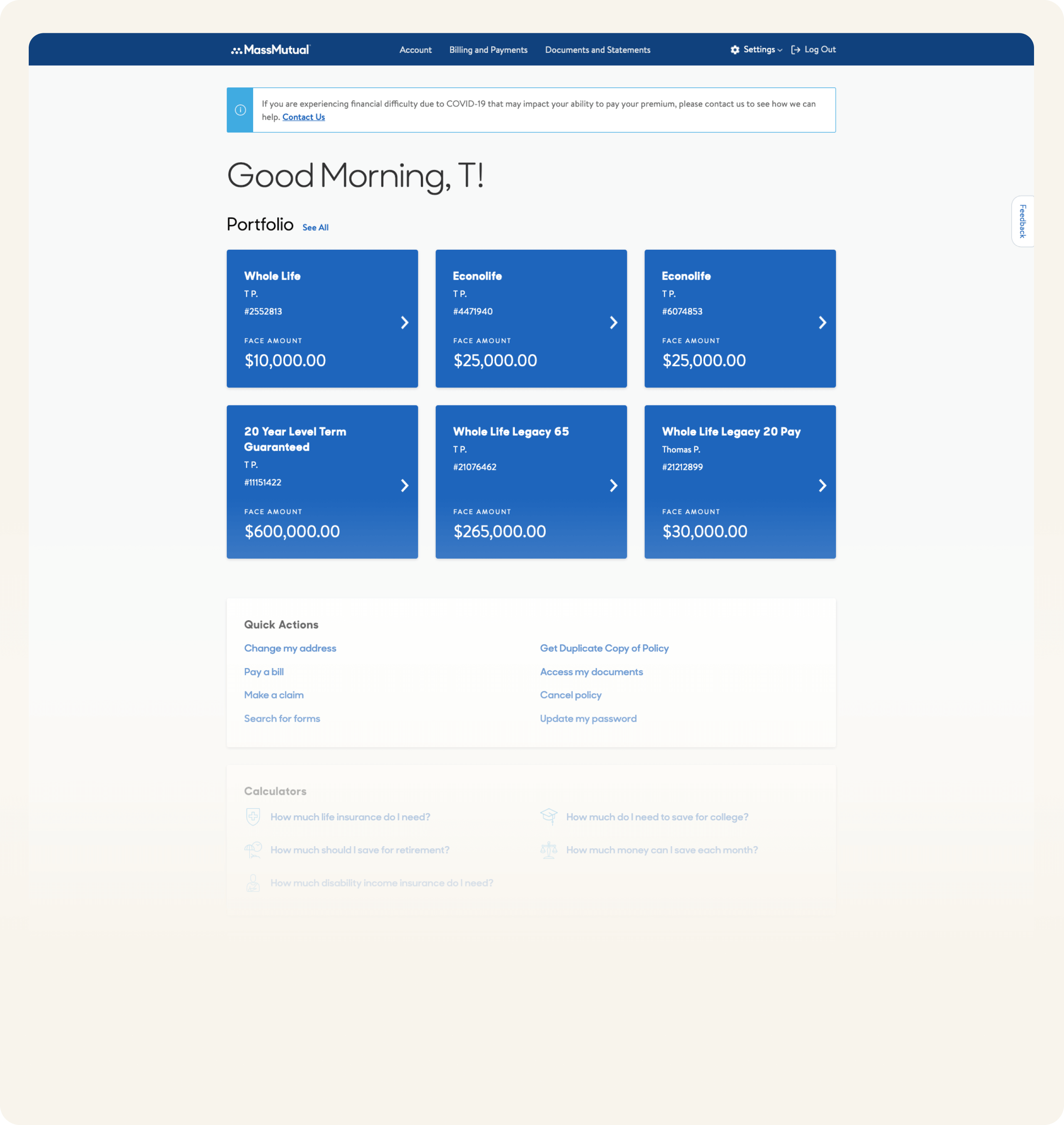
- Existing design usability study
A usability evaluation of the existing dashboard revealed consistent gaps between customer expectations and the information provided.
- Information depth was insufficient:
Customers expressed dissatisfaction with the limited information available on the dashboard. High-level figures alone were not enough to support confidence or decision-making.
- Policy value goes beyond face value:
Users consistently indicated that “face value” was not the only metric they cared about; context such as coverage details, benefits, and related financial information mattered.
- Quick links increased friction:
9 out of 10 customers found quick links unhelpful, as they introduced extra steps rather than enabling faster task completion.
- Strong demand for policy understanding:
8 out of 10 customers wanted to learn more about their policies directly from the homepage, rather than navigating to separate sections.
- Payment context mattered:
9 out of 10 customers found it intuitive to review what they were paying for alongside richer policy details. Isolated payment information felt incomplete without supporting context.
This proved it was important to move away from a navigation-heavy dashboard toward a content-rich, contextual overview, where policy information, payments, and next actions are presented together in a way that supports clarity, trust, and informed decision-making.
- Information depth was insufficient:
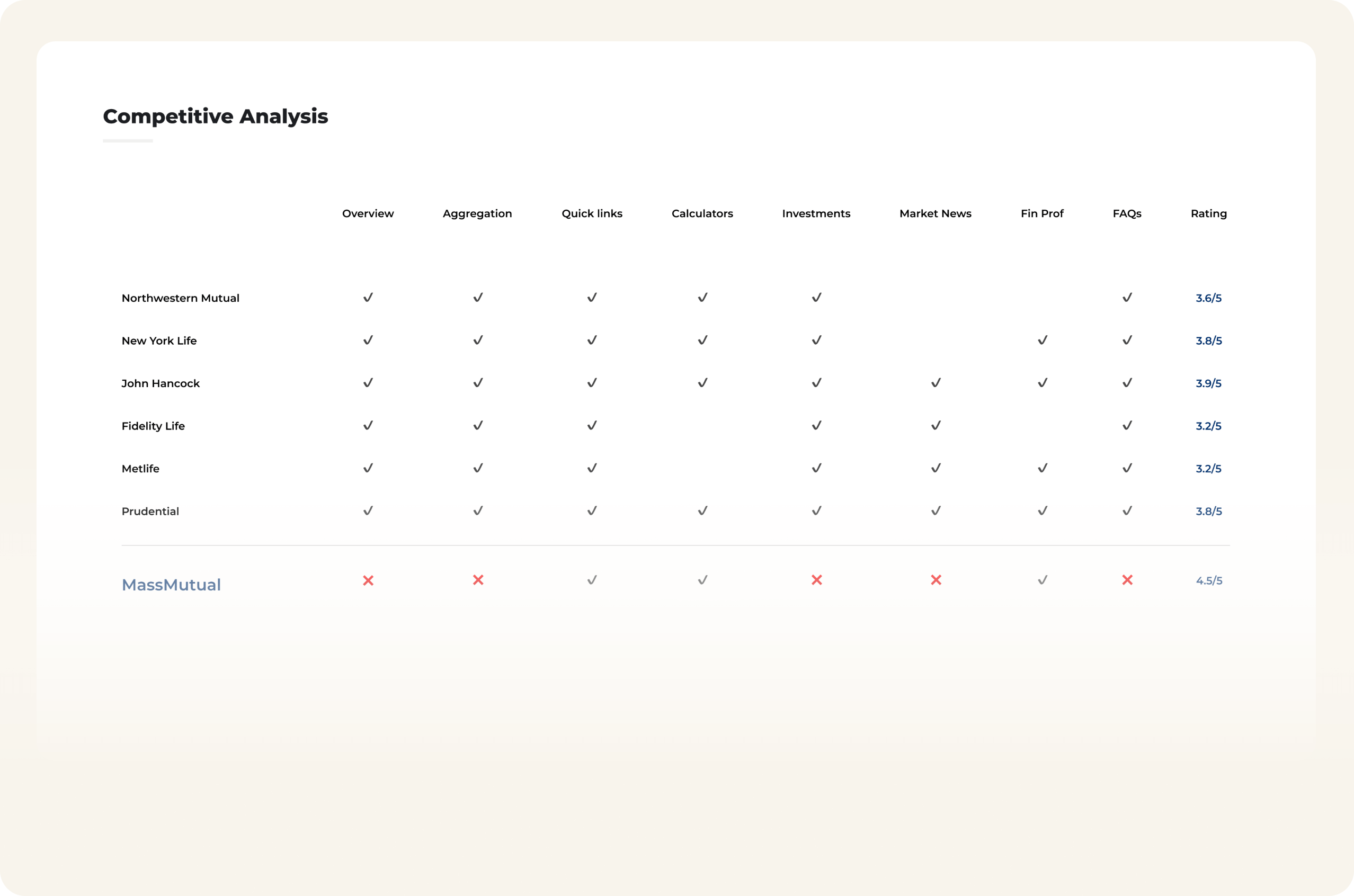
- Competitive Analysis
Competitors rely heavily on overviews and quick links, creating navigational dashboards rather than decision-making experiences—revealing an opportunity to differentiate through clarity, context, and action-first design.
- Northstar usability study
- Evaluate design direction fit:
Assess how well each Northstar design option resonates with policyholders, focusing on clarity, trust, and perceived usefulness.
- Compare effectiveness across options:
Identify which design direction better supports key user tasks, understanding, and confidence when managing policies.
- Surface strengths and gaps early:
Understand what works well and what creates friction in each option, enabling informed trade-offs rather than subjective design preference.
- Inform a confident directional decision:
Use qualitative evidence to converge on a single Northstar that could scale into the final homepage experience.
- Evaluate design direction fit:
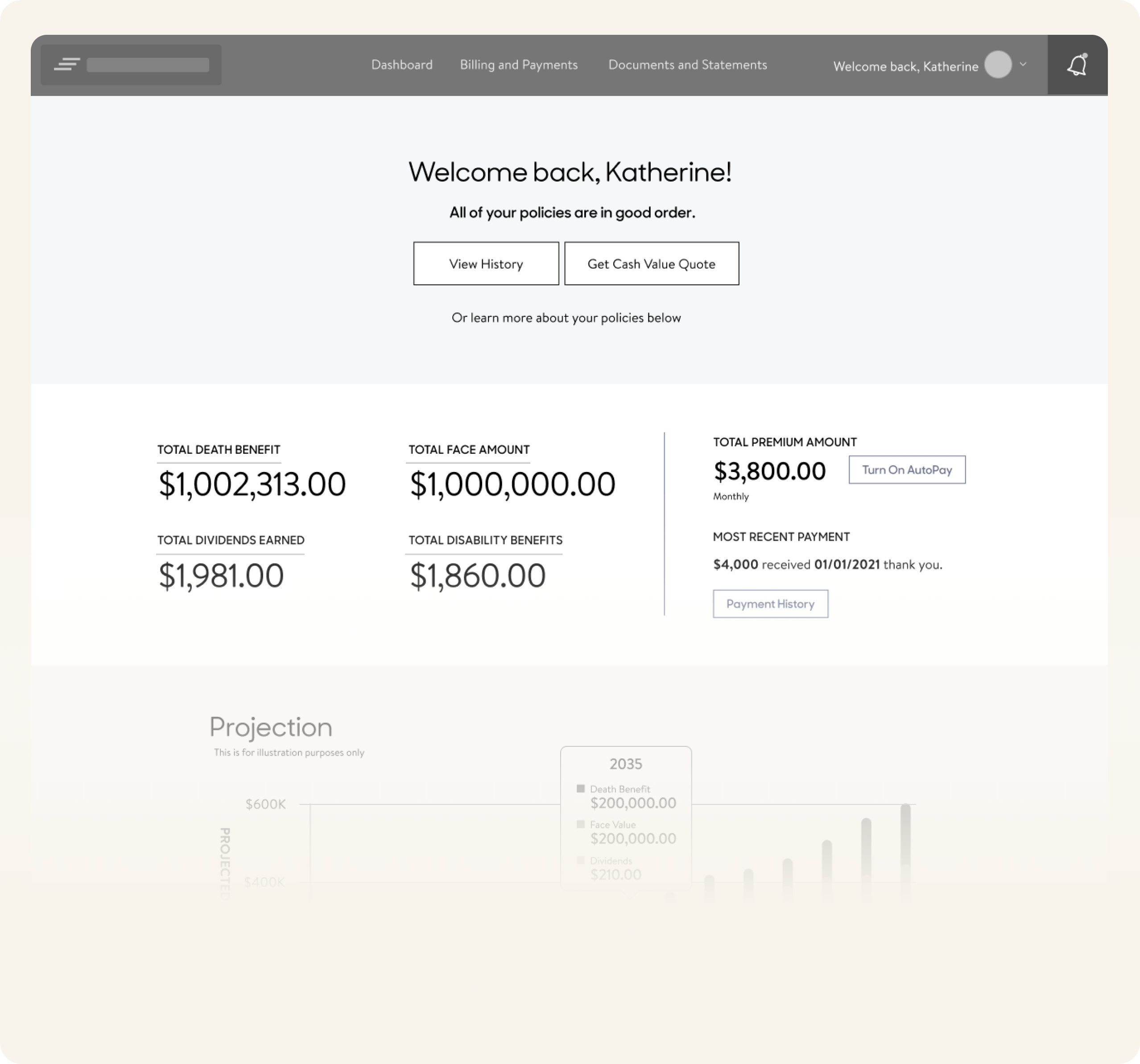
- Design A
- Terminology confusion:
The label “People on Policy” was unclear to participants, with several unsure whether it referred to beneficiaries or coverage-related roles.
- Hidden actions:
Participants did not immediately notice the three-dot menu for additional actions, though those who discovered it appreciated the reduced visual clutter.
- Top summary lacked clarity:
The high-level summary caused confusion and did not clearly communicate what was most important at a glance.
- Missing payment visibility:
Participants noted they could not easily determine when the next payment was due—an important gap given billing was a primary login reason.
- Low-value visualization:
The cash value projection graph was perceived as unnecessary; users felt confident about their insurance and did not find the projection actionable.
- Ease of use score: 6.6 / 8
- Terminology confusion:
- Design B
- Stronger guided experience:
Participants consistently reported that Design B better guided them through their policies and explained key aspects more clearly.
- Layout discoverability issues:
Some users missed the “What would you like to do?” section, indicating the need for stronger visual hierarchy or placement.
- Information hierarchy opportunities:
Participants suggested that critical messages and status information would be more effective if surfaced at the top of the page.
- Ease of use score: 7.85 / 8
- Stronger guided experience:
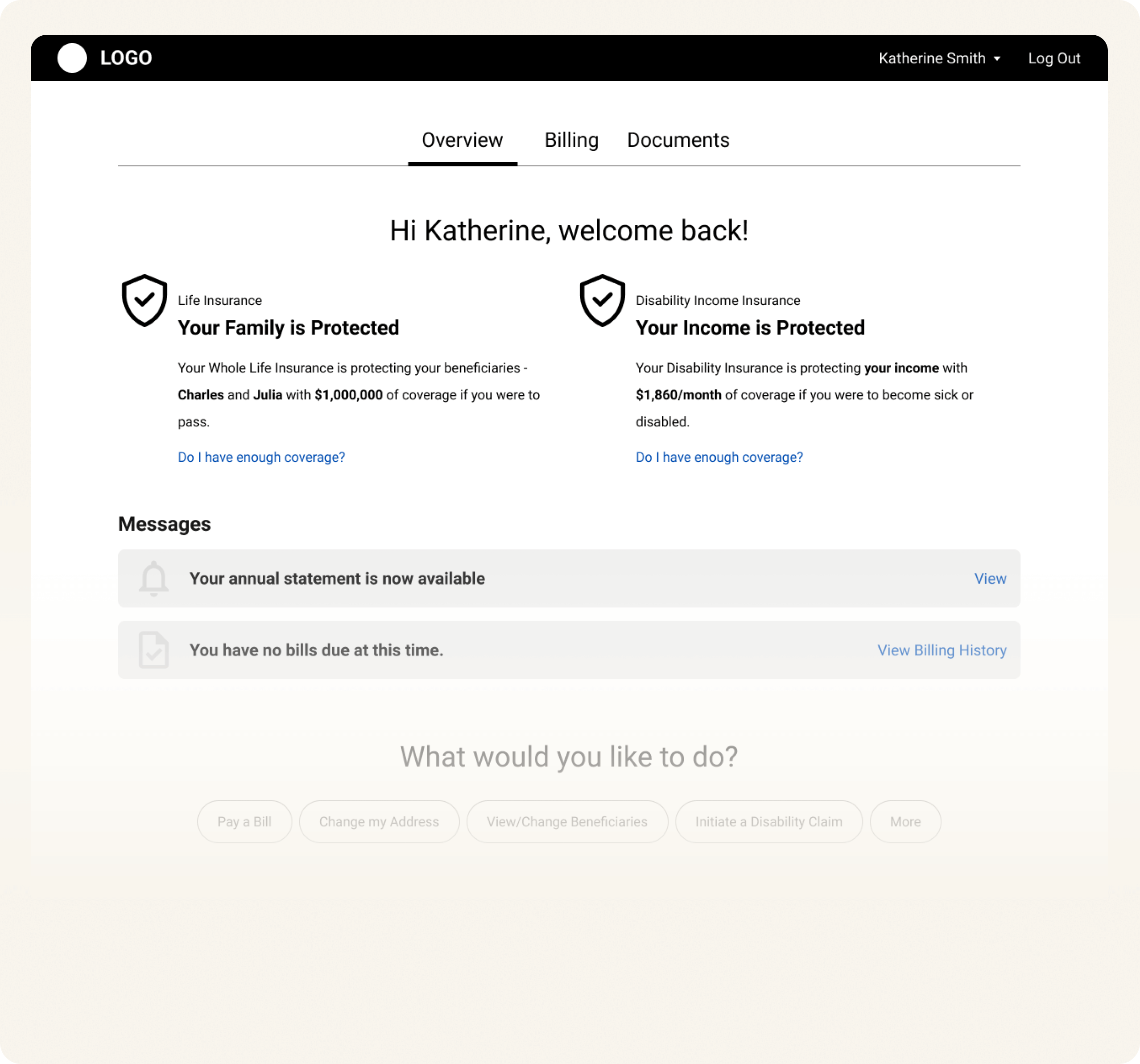
Design B scored higher on overall ease of use and better guided users through their policies, making it the stronger Northstar direction, while incorporating key learnings from Design A around payments, terminology, and visual simplicity.
Decision: Select Design B as the Northstar while incorporating key learnings from Design A.
Why: Design B better guided users through complex policy information and improved clarity and confidence.
Tradeoff: Required stronger hierarchy tuning to improve discoverability of key actions.
Mitigation: Refined layout, placement, and emphasis based on usability feedback before final implementation.
Final Visual Design
A clear, prioritized information hierarchy aligned to customer intent enabled customers to quickly identify policy status, payments, and next actions without navigating deeper.
Rich, contextual summaries combining coverage, payments, and benefits allowed customers to develop a better understanding of their policies directly from the homepage, increasing meaningful interaction with policy details and reducing reliance on secondary navigation.
An action-oriented layout—with relevant next steps surfaced at the right moment—let users take action directly from the homepage instead of treating it as a pass-through. The homepage shifted from a passive landing page to an active control surface for policy management.
Next actions I would have taken
- Extend the design system across all policy and product pages:
- Apply the new information hierarchy and interaction patterns consistently to ensure a cohesive end-to-end experience.
- Expand the approach to additional transactions:
- Scope and adapt the design principles to support other customer transactions, enabling consistent clarity and efficiency beyond the homepage.
Conclusion
This redesign repositioned the homepage as a trusted control surface rather than a navigational landing page. By grounding decisions in user intent, usability research, and competitive analysis, the final experience surfaces critical policy information and actions upfront, reducing friction and increasing confidence for customers managing complex insurance portfolios.
The resulting increase in engagement demonstrated that clarity and relevance drive meaningful interaction. More importantly, the work established a scalable foundation—design patterns, content hierarchy, and decision principles—that can be extended across policy, product, and transactional experiences to support long-term consistency and growth.
Effective dashboards are decision-making systems, not navigation surfaces. When information hierarchy reflects real user intent and complexity is translated, teams can scale confidence and action without overwhelming customers.